Online resouces
Under construction!
In the nearly 20 years I've been using the internet, I've found a lot. A LOT. of stuff. Here is where I want to share it!
I grew up in a family of end-users, a lot of this stuff may seem obvious but there's a lot I never knew until very recently!
The Essentials

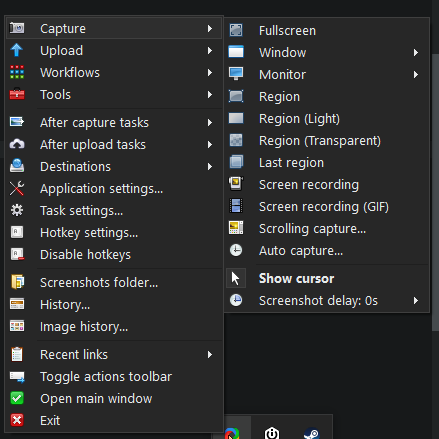
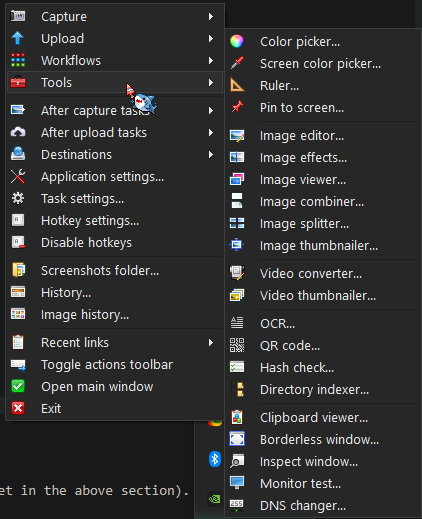
ShareX - https://getsharex.com/
Simple but super feature-rich screen capture program with lots of helpful tools. I use the screen color picker (eyedropper) a ton! Lots of screenshots on this page (and this site) were done with ShareX!
YT-dlp - https://github.com/yt-dlp/yt-dlp
Extremely powerful command-line audio and video downloader!! NOT just for youtube! Break free from those weird conversion sites as I have!
Also check out this cheet sheet! https://www.ditig.com/yt-dlp-cheat-sheet
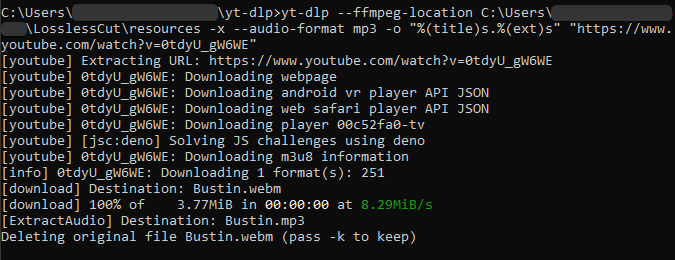
The line I use to save audio from youtube after running it from CMD on Windows is yt-dlp --ffmpeg-location [FFmpeg installation location] -x --audio-format mp3 -o "%(title)s.%(ext)s" [youtube video link]
The "-x" extracts only audio, the -o is "output". No brackets for the "FFmpeg installation location" and "youtube video link" parts
easy peasy
Capitalize My Title - https://capitalizemytitle.com/
Self-explanatory title-capitalization checker for Chicago/MLA/etc writing formats.
Quality of Life
Hotkeys! (Mostly Windows+Firefox)
It's a little hard to remember all the ones I use but there are some I only recently learned that make browsing (and computer in general) more convenient and slick
FIREFOX:
https://support.mozilla.org/en-US/kb/keyboard-shortcuts-perform-firefox-tasks-quickly
There are a lot here but I find these really important:
- [Ctrl + D] (Bookmark current page),
- [Ctrl + B] (Bookmarks list),
- [Ctrl + E] (Focus search bar),
- [Ctrl + T] (New tab),
- [Ctrl + N] (New Window),
- [Ctrl + W] (Close tab),
- [Ctrl + Shift + T] (Re-open closed tab),
- [Ctrl + Shift + N] (Re-open closed window),
- [Ctrl + Tab] (Go one tab right),
- [Ctrl + Shift + Tab] (Go one tab left),
- [Ctrl + +/-/0] (Zoom In/Out/Reset),
- [F3 / Ctrl + F] (Find in page),
- [F11] (Fullscreen),
- [Alt + ←/→] (Back/Forward),
- [F12] (Dev tools),
- [Right Click + Q] (Dev tools - Inspect Element)
- (More soon)
Link Cleaner - https://linkcleaner.app/
Removes tracking and data collection strings from links (Youtube, Amazon etc) and makes them much shorter and nicer. Open source and has a bulk mode if you don't want to chop off, say, a million "?si=" youtube tracker strings by yourself.
Filmot - Search in Youtube subtitles, captions, transcripts - https://filmot.com/
Pretty self explanatory but very useful!! Can't imagine what stuff I'd still have a hold of if I knew about this way way earlier. Allows filtering between automatic and manual subs, highlights every matching result... uhhh this is basically just Ctrl F for youtube lol
ezgif.com - many-featured online file modifying - https://ezgif.com
Yeah honestly there are some things I only ever do so rarely that I haven't bothered figuring out how to myself. Like converting a gif to an mp4 and vice versa. This site is really useful for when I just need some file into some other thing, or cropped or optimized or whatever. This site is mainly for visual media but it's pretty nice and easy to use.
On the other hand there is almost certainly a good offline yt-dlp equivalent, which would probably also use FFmpeg (or just FFmpeg itself), although which of them seems close to ezgif featurewise I have yet to figure out.
"Digital Decommercialization - How To Block Ads On The Internet" - https://blog.amberdevs.gay/how-to-block-ads-on-the-internet/
Really simple and straightforward guide aimed at less tech-familiar people. Share it with someone you know who drowns in ads!
"We’ve freed Cookie’s Bustle from copyright hell. Here’s how." - https://gamehistory.org/cookies-bustle/
Lengthy but detailed account of one of many challenges media preservationists face (dubious copyright claims on other people's work), this one has a happy ending (copyright troll told to kick rocks). Important for all creators in ways to push back against abuse of one of the worst-implemented systems of the modern day (that advice is near the end of the article).
I witnessed this happening to the video for iconic 90s dnb mix Peshay Studio Set, which has since been restored as well!
Browser Extensions

uBlock Origin - https://ublockorigin.com/
This is the one single thing I believe everyone online should learn how to use. This is it right here.
Not only is it for ad blocking, but you can also select elements from pages to get rid of forever (most, not all) (see Digital Decommercialization - How To Block Ads On The Internet in the above section).
You can also add filters, disable custom fonts, disable javascript, etc. Very very very good.
My site is very Youtube-heavy. Please use this or you will think I'm not all there mentally (I'm not but for other reasons)

Indie Wiki Buddy - https://getindie.wiki/
If you've ever been on a Fandom.com/Fextralife/etc page for your favorite game/show/etc, you've probably noticed that it looks like shit. Several sidebars and pop-ups exist only to pull you away from your desired information, often to things not even tangentially related.
Not only this, it also tends to lift wiki information directly from official wikis for the media.
It may be obvious, but this is meant to draw traffic away from these dedicated sites and towards Fandom, which by its layout is now very revenue-driven and low-effort. Indie Wiki Buddy is a browser extension which offers alternative, cleaner wiki pages, as well as offering the user a link to the media's official wiki, if one exists.
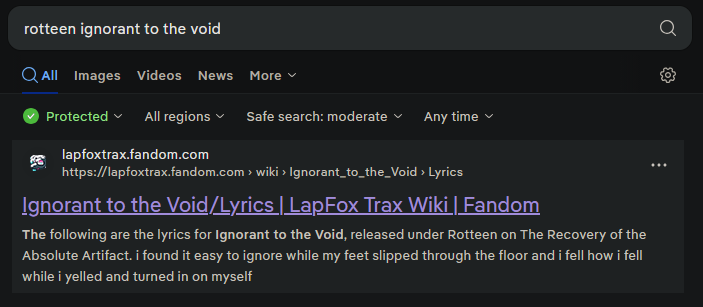
I haven't had to mess with the settings for this since I installed it like half a year or so ago. One and done. You deserve it too!
Cool Sites

AVID - Audiovisual Identity Database - https://www.avid.wiki/Main_Page
So, so, so many TV bumpers and splashes. This is an incredible multimedia database that I've consulted a few times for my own projects. Also cute mascots!
It has a "Random Page" button which is fantastic. Test cards, warning screens, radio jingles... god, I've only barely scratched the surface of this thing... it's got rainbow motifs everywhere, what am I doing?
Webgbcam - https://maple.pet/webgbcam/
Gameboy camera-like plugin for webcams!
Internet Time - https://gwil.garden/internet-time/
A timezone-free standard for worldwide time. I've honestly never heard of this, it has some neat history, apparently it was adopted by Phantasy Star Online? I like the idea of moving away from timezones for a lot of reasons (also DST get that nonsense out of here)